

ContentsStart0%
A Friday-night booking, and the AI picked another service
Before leaving work on Friday, you tell the AI assistant on your phone: “Check whether Sunny Hill Bistro in Taipei’s Da’an District has a table for four at 7 p.m. this Friday.” The AI readily agrees, then opens a different booking service, or simply replies “no suitable tool found.” To the user, this is just a mildly frustrating experience. For the tool’s developer, it is less simple. The API health check passes, the tool is in the install list, and even the feature description is written clearly, yet the model makes no call at all. There is no error message in the backend and no failed request in the logs, because the tool never got the chance to run.
As AI applications gain the ability to use tools on their own, this kind of problem deserves a fresh look. Developers used to worry about whether the API worked and whether the parameters were right. Now there is a prior condition: is the model willing to choose your tool? The tool name, its description and its parameter structure can all shape how the model judges what a tool can do. Among them, the Tool Description is a field developers can adjust relatively easily, which makes it a good place to start verifying. LS-Labs designed a set of controlled experiments around it, to ask: with the tool’s function and parameter structure unchanged, can modifying only the Tool Description change an AI’s tool choice?
The result was clear. In an equal-length comparison, both texts were just 22 Chinese characters long. The version that spelled out the task inputs was chosen first 71 times in 96 applicable-task trials; the vaguer version was chosen only 41 times, a gap of 31.25 percentage points. But whether the model finally calls a tool is the combined result of several stages. Unless you first work out at which stage a tool loses its chance, editing the Description alone may not solve the problem.
A tool that was not called is not necessarily a tool the model dislikes
Between a tool being connected to a system and actually being executed, it may pass through several rounds of filtering. Suppose an AI application connects dozens or even hundreds of tools. The system will not necessarily hand the model every tool’s full definition in every conversation. Some applications load them directly and let the model choose from a fixed list; others first search a tool catalog based on the user’s request and load only a few relevant candidates. This split affects not only whether a tool can be seen, but also whether the developer should fix retrieval, the description, or the back-end execution flow first.
That means “not called” has at least two explanations. In the first, the tool did not make it into this turn’s candidate list, so the model never knew it could use it. In the second, the tool was loaded, but after comparing several options the model called a different one. The former involves candidate retrieval; only the latter is model choice. The difference can be understood through information retrieval. A search engine must first find potentially relevant pages before it can rank them; likewise, if a tool is not in the candidate set, no amount of description detail can affect this decision. This article therefore splits the process around tool calls into four stages that are easy to observe.
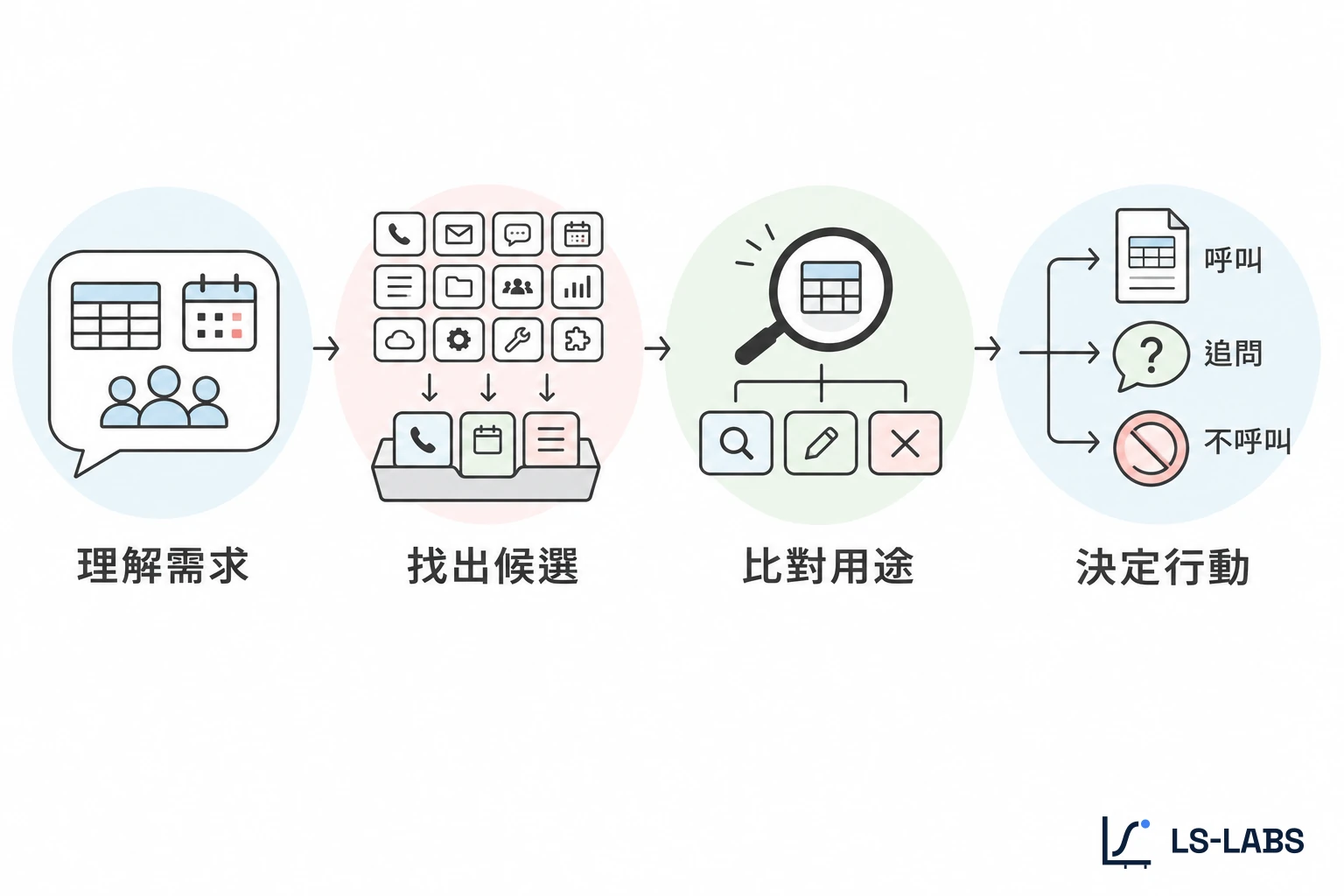
First is request representation. When a user says “is there a table for four tonight,” the model needs to understand that this is an availability check; if the user instead says “cancel the table I booked earlier,” the task becomes modifying an existing reservation. Both sentences concern restaurants, but the operations they map to are completely different. Next is candidate retrieval. Based on the list of available tools and the current request, the system decides which tools get a chance to enter the model’s working scope. This step can be done by an external retriever, or there may be no separate retrieval process at all. Once candidate tools actually appear in the model’s context, the process reaches semantic matching, the focus of this study. The model has to work out each tool’s purpose and conditions of use from information such as the name, the Description and the parameter Schema.
For example, among restaurant services, party_size hints that the tool needs a number of diners, while reservation_id usually means the operation targets an existing booking record. Last is the final decision. Given the task and the candidate information, the model decides whether to propose a tool call, which tool to choose and what arguments to fill in. Actual permission checks, API execution and returning results remain the job of external systems. These four stages are not an execution pipeline that every AI platform separates explicitly; they are an analytical framework for locating problems.

Compared with LS-Labs’ four TSO stages, candidate retrieval roughly belongs to “candidate exposure,” while semantic matching and the final pick fall under “model selection.” Only after the model proposes a tool call do parameter filling, call validation and actual execution come into play. Without first confirming where a tool loses its chance, it is easy to mistake insufficient exposure for a description that is not appealing enough; conversely, you could spend a lot of time rewriting copy without touching the retrieval conditions that are actually blocking the tool.
Which stage do Tool Calling, apps and MCP each affect?
Here is another point that is often confused: how a tool is connected is not the same as how a tool is selected. Tool Calling usually refers to the ability of a model to propose function calls in a defined format, with the application taking over execution. Developers can supply tool definitions directly for the model to choose from, or combine them with other tool retrieval mechanisms. Plugins or apps sit more at the product layer. Users may install, connect, authorize or directly specify an app, changing the range of services available to the model. But even if a user has connected an app, that does not mean every function under that app is loaded in every conversation.
As for MCP (Model Context Protocol), it mainly addresses how an AI application talks to external tool servers. It defines interfaces for tool descriptions, parameter Schemas, tool lists and calls, but does not dictate how a model must rank candidate tools. In other words, MCP lets the host obtain a tool list, but whether the host filters it further, when tools are loaded and how the model finally chooses can all depend on the application’s design. For example, take the same restaurant availability service connected to two AI applications. Application A gives the model full tool definitions every turn; Application B first searches a tool catalog and then loads the matching candidates into the model.
Even if both use exactly the same Description, the reason for a missing call can differ. In A, the tool is already in front of the model, so the model’s choice behavior should be investigated first; in B, you must first confirm whether the tool passed the earlier retrieval step. This is why the study measures “candidate recall” and “model first choice” separately. The platform mechanisms are drawn from OpenAI Function Calling, the ChatGPT Apps help article and the MCP Tools specification. The documentation was checked on 5 November 2026.
How do you test the effect of a Tool Description?
The control principle is simple: change as little as possible about what the tool can actually do, and change only the information the model and the retriever see. The experiment has two parts. The first uses a local retriever to test whether different Descriptions affect a tool’s chance of entering the candidate list. The second hands candidate tools directly to a language model to see whether, among options with identical functions, different descriptions change its first choice. The two experiments are deliberately not chained into one complete system, so that retrieval results are not mixed up with model preferences when they are interpreted.
First, can the tool be found?
The recall test uses 60 synthetic Traditional Chinese tools, all named with code names, and 12 test questions. Each target tool has two Descriptions. One uses explicit task language that states the operations, objects and conditions the tool handles; the other is promotional, stressing the service experience without saying clearly what the tool can actually do. In other words, this stage does not test whether a Description is well written, but whether it leaves enough retrieval cues in the way users ordinarily speak.
The retriever is a local BM25 whose index covers the tool name, description, parameter names and parameter descriptions. Each query returns at most the top five tools, and tools with a score of zero are not included as candidates. Results are measured with Recall@5, that is, how many test questions get the target tool recalled into the top five. To see the effect of Chinese word segmentation, the test used both splitting on whitespace and punctuation and consecutive two-character splitting. This experiment involves no language model; it simply observes whether a tool description can establish a link to the user’s need under literal retrieval.
Then, let the model choose among three tools
The second part uses Gemini 3.1 Flash-Lite and offers three restaurant availability tools with identical functions, loading the full definitions straight into the model with no extra tool search. The test has eight questions that suit a tool and four that fall outside the tools’ capabilities. Each question was run twice under each of six tool declaration orders, so every test condition has 96 applicable-task observations and 48 out-of-scope observations. The three batches together sent 1,440 formal API requests. Each batch examined a different signal. The first compared the basic description, a synonym rewrite, and a version that fills in the task inputs.
The second batch controlled description length further, comparing a concrete description with an equal-length neutral one to reduce interference from text length. The third widened the comparison to Tool Name, parameter Schema descriptions and usage examples, to see how different metadata fields affect choice. Every experiment recorded the first function call the model proposed. If the model decided not to call a tool, that observation stayed in the denominator. The “target-tool first-choice rate” in this article means the share of cases under a test condition in which the model first selected the designated target tool. It does not mean the API ran successfully, and it cannot be read directly as the final task success rate.
Experiment 1: a vague tool description may not even reach the candidate list
The first set of results shows that whether a Description contains the task vocabulary users may use directly affects literal retrieval. With consecutive two-character splitting, the task-language version recalled 3 of 12 everyday-phrasing questions, against 1 for the slogan version; with the second request set, the two rose to 5 and 2. But if Chinese is split only on whitespace and punctuation, both versions recalled zero across the combined 24 questions.
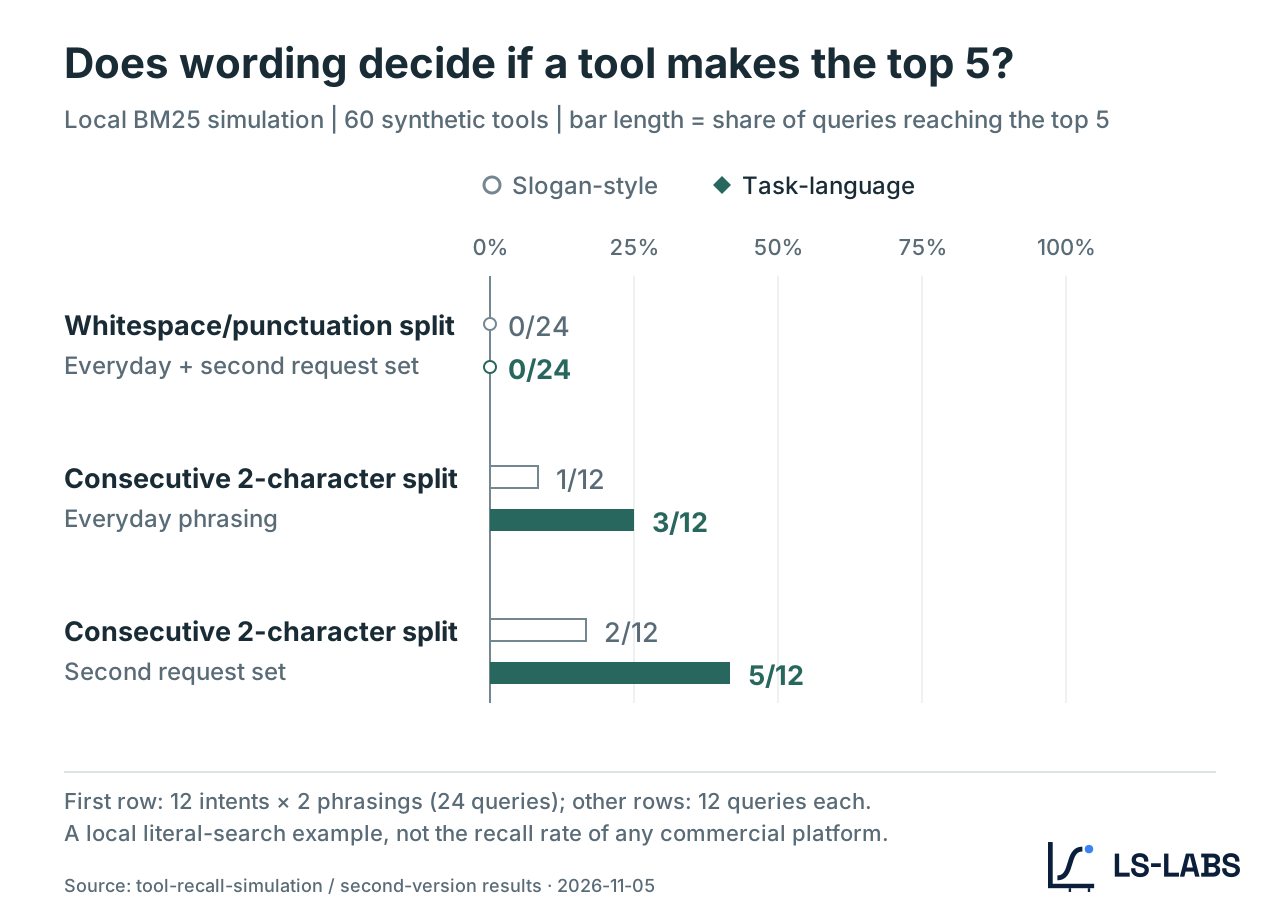
View full data: Table 1 | BM25 candidate recall, Recall@5
| Segmentation method and question set | Task-language version | Slogan-style version |
|---|---|---|
| Whitespace and punctuation split (two sets combined) | 0/24 | 0/24 |
| Consecutive two-character split (everyday phrasing) | 3/12 | 1/12 |
| Consecutive two-character split (second request set) | 5/12 | 2/12 |
The individual questions make this clearer. Q04 asks: “Tomorrow morning I want to go from Taipei back to Tainan; can I still buy high-speed rail tickets?” The task-language version reads “Look up high-speed rail trains and remaining seats for a given origin, destination and date.” Because the description contains “high-speed rail,” the retriever found a literal match and ranked it first. The other version used wording about city strolls and wonderful journeys; it may call a travel service to mind for a human reader, but it gives the retriever too few cues. On this question, none of the 60 tools got a valid match score. This is not a shortfall in a model’s understanding; BM25 mainly relies on term matching in the first place. Even if two passages mean something similar to a human reader, if no literal link exists the retriever may not find it.
More interesting is the restaurant question. Q01 uses everyday words such as “seat” and “eat,” while the target tool’s Description uses “reservation” and “dining” (English renderings of the Chinese wording). With consecutive two-character splitting, neither description recalled the target tool. That is, even a Description that already uses the correct professional vocabulary can miss retrieval because it differs from what users actually say. Conversely, cutting the segmentation finer can create matches with no real semantic link. For example, a single Chinese character in promotional wording happens to overlap with a name in the user’s question, so an otherwise unrelated tool gets a score.
This shows that retrieval results cannot be judged only by whether a tool entered the top five; the fields and terms that actually matched also need checking. This set of results has a clear scope, though. What it shows is: in a local BM25 literal-retrieval setting, both description wording and the segmentation strategy affect candidate recall. It did not measure the actual tool exposure rate of any commercial AI platform, and it cannot be taken to imply that a semantic retriever would improve by the same proportion. But for tool catalogs that use literal or hybrid retrieval, it is worth noting. A tool needs not only to say what it can do, but also to give the retrieval system a chance to find it from the user’s language.
Experiment 2: with three identical tools, which one does the model pick?
Next, the interference from candidate retrieval is removed. This time the model sees three restaurant availability tools with identical functions in every round. All three have the same execution ability; differences come mainly from the names, descriptions or parameter information deliberately adjusted in the experiment. If the model’s choice distribution changes, the effect of metadata on the first tool choice can be observed more directly. The results of the three batches are summarized below. So that differences reflect only the metadata, rather than changes in tasks or candidate counts, all three batches kept the same question set, model settings and three candidate tools.
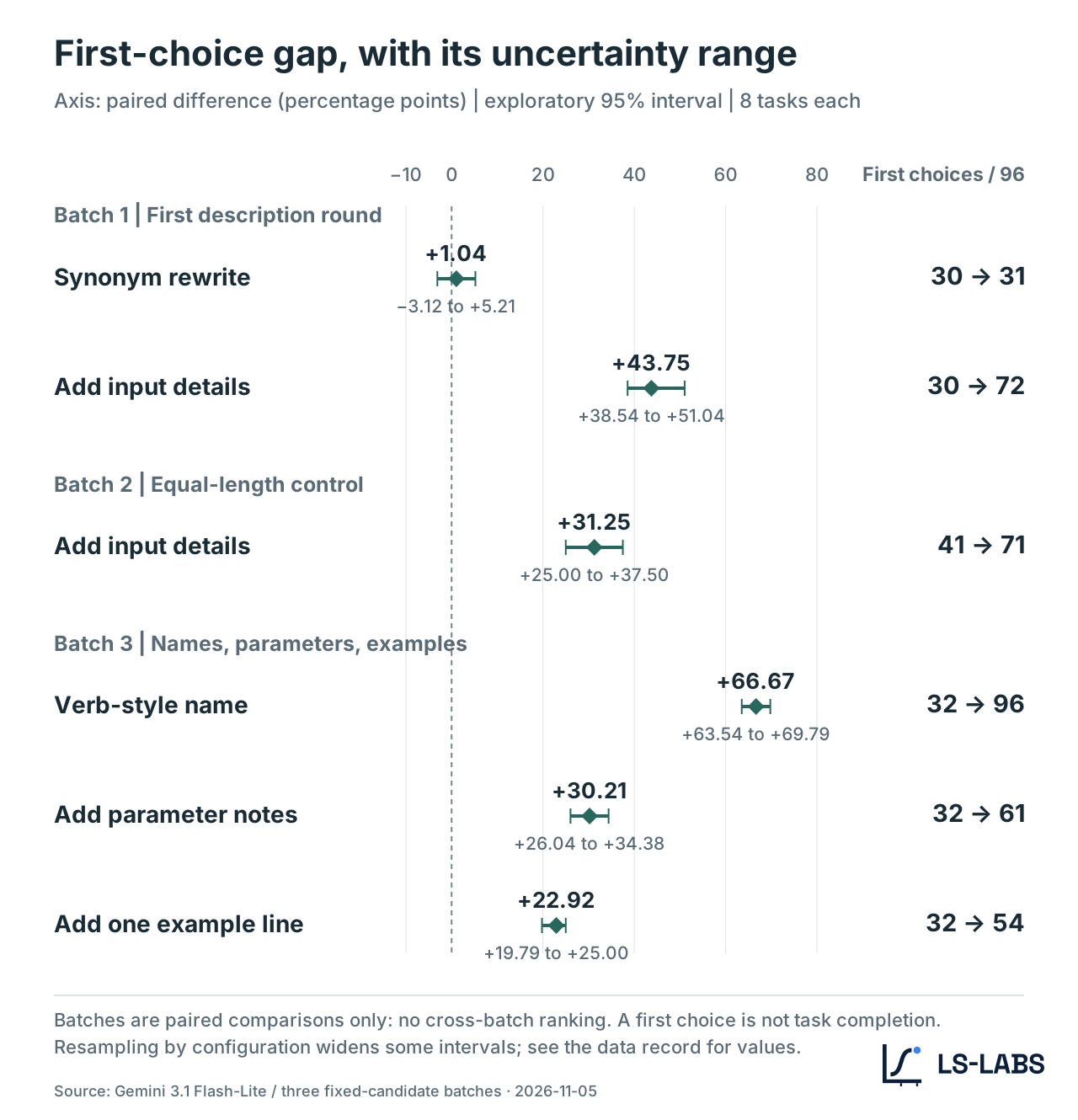
View full data: Table 2 | Change in first choice for the target tool, with task-resampled intervals
| Change and baseline | First choices | Difference (percentage points) | Task-resampled 95% interval |
|---|---|---|---|
| Synonym rewrite vs basic description | 31/96 vs 30/96 | +1.04 | −3.12 to +5.21 |
| Three inputs filled in vs basic description | 72/96 vs 30/96 | +43.75 | +38.54 to +51.04 |
| Three inputs filled in vs equal-length neutral description | 71/96 vs 41/96 | +31.25 | +25.00 to +37.50 |
| Verb-style tool name vs basic naming | 96/96 vs 32/96 | +66.67 | +63.54 to +69.79 |
| Added parameter Schema descriptions vs basic setup | 61/96 vs 32/96 | +30.21 | +26.04 to +34.38 |
| Added usage example vs basic description | 54/96 vs 32/96 | +22.92 | +19.79 to +25.00 |
Note: each row compares conditions within the same batch only; percentage-point differences from different batches should not be read directly as one overall effect ranking.
Same 22 characters: the difference is not how much is written but how clearly it says it
The equal-length comparison in the second batch is the one this study cares about most. To rule out the explanation “the description is longer, so the model picks it more easily,” the experiment held both groups of Descriptions at the same 22 Chinese characters, and the input token counts of every paired request were identical. One version explicitly lists three inputs: “restaurant name, dining date and party size.” The other uses a more neutral service introduction that does not spell out operating conditions. The tool functions, parameter structure and test questions were unchanged in both. The former received 71 first choices in 96 applicable-task observations, the latter only 41. A gap of 31.25 percentage points cannot be explained by text length alone.
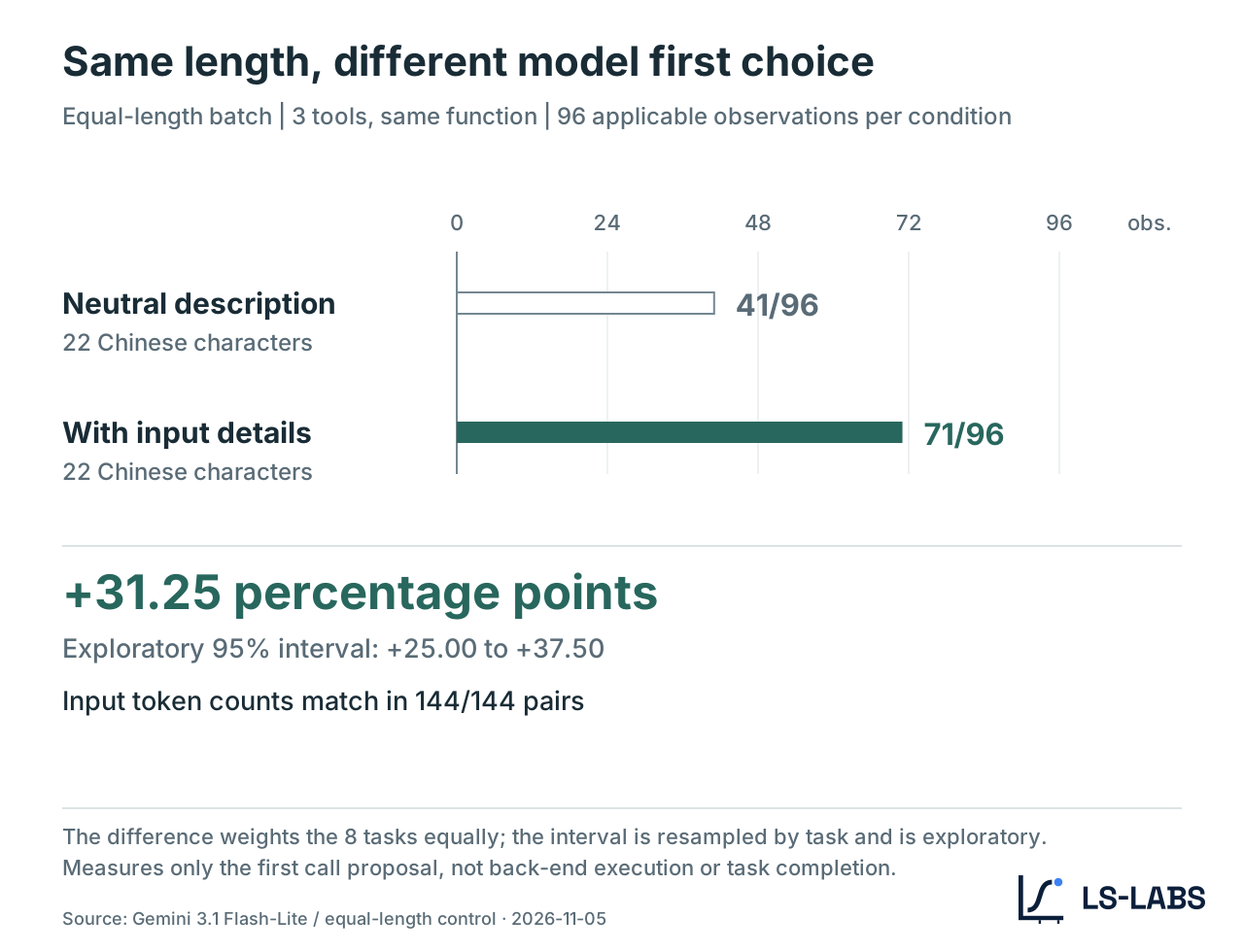
The more specific the information in a Description, the more easily the model can match the user’s request to the tool’s capability. For example, when a user mentions dinner for four and the description says it needs the number of diners, a direct link forms between the two signals. By contrast, text like “Provides convenient, high-quality dining services” may work as promotion for a human reader but does not necessarily help the model judge whether the tool suits the task at hand. This does not mean the model is performing some fixed field-by-field comparison, and it cannot be used to reconstruct the model’s internal reasoning.
What can be confirmed is that, under these controlled conditions, whether the description explicitly contains the information the task needs did change the model’s first-choice distribution. A synonym rewrite did not bring a comparable effect. In the first batch, the basic description was first choice 30 times and the synonym rewrite 31 times, an increase of only 1.04 percentage points, and the 95% interval crosses zero. These results therefore do not support the inference that “simply saying it differently will clearly raise a tool’s first-choice rate.” What opens the gap is informational content, not polished phrasing.
Tool Name and parameter descriptions matter just as clearly
The third batch widened the scope beyond the Description. First, the tool name. When a tool that used a code name like service_a was renamed find_available_tables, the target tool was first choice in all 96 applicable-task observations of that batch, versus only 32 under the basic condition. This was the largest change among the signal experiments. It is also why later diagnosis should look at name, description, parameters and examples separately.
One caution, though: all three tools originally used code names, so switching to a verb-style name added meaning and also made that tool stand out in the candidate list. The experiment therefore cannot yet tell how much of the first-choice increase comes from a semantic match between name and task, and how much from the model’s preference for an unusual naming form. The effect of the parameter Schema is easier to understand. Originally only field names such as date and party_size were given; after adding descriptions like “Dining date, YYYY-MM-DD” and “Number of diners, including children,” first choice of the target tool rose from 32/96 to 61/96.
The tool’s function did not change, but the meaning and use of its input fields became clearer. Usage examples also had an effect. Adding “Example: look up the slots a restaurant has open for four people on a given day” at the end of the Description raised first choice from 32/96 to 54/96. Across the three batches, the model does not decide from the tool name or a single description alone. The name, the Description, the Schema descriptions and the usage examples can all be clues for judging whether a tool fits. This also explains why, with identical tool capability, the model can still show a clear preference. What the model sees is not the full code behind a tool but the tool definition the application hands it. When those definitions change, the capability and use cases the model understands can differ even if the back-end service has not changed at all.
A higher first-choice rate is not a higher task-completion rate
There is another point in these experiments that is easy to overlook. Under these test conditions, every applicable task produced a tool-call proposal that met the test requirements, and the out-of-scope tasks produced no mistaken calls. So the gaps in Table 2 mainly reflect this: when several tools can complete the same task, whom the model gives its first call to. That is a different question from whether the model can correctly judge a tool’s suitability. First-choice rate can answer only a preference question, not a task-outcome question.
If three tools are functionally identical, a model switching from A to B does not mean the user necessarily gets a better result. Only in real service settings, where candidate tools differ in price, latency, data quality, permissions or execution ability, can selection preference go on to affect task outcomes. In addition, the experiment was not connected to any real restaurant system and did not actually complete a lookup or booking. The test checked whether the call proposal and parameters the model produced matched the test definition, not whether an external system executed successfully. Another variable to note is the model’s existing selection bias. Among functionally identical tools, code names, declaration order or naming style can all influence the model’s first choice. That is why the experiment used several declaration orders and compared different test conditions on the same questions.
If you test only a few questions, it is easy to mistake a tool that happened to be chosen for evidence that Description optimization worked. A more complete check repeats the comparison on the same question set and candidate configuration and records the different outcomes: no call, another tool chosen, and the target tool chosen. Only then can you tell whether an observed difference comes from the description change or from an existing model bias. For parameters and return values after the call, read on with TCC’s 152 acceptance tests; for how a site provides authorization and completion credentials, compare AX’s local booking experiment.
Back in practice: what should developers fix first?
From this experiment alone, the easiest conclusion to draw is: write tool descriptions more concretely, and use names and parameter descriptions whose meaning is clear. That direction is fine, but it lacks a premise. Not every missed call is best solved by editing the Description. Suppose a developer finds that a booking tool has almost no usage records. The first thing to do is confirm whether it actually enters the model’s candidate list. If the tool is excluded at the retrieval stage, check the index content, retrieval wording, recall thresholds and tool-loading strategy first. In that case, changing only the Description the model sees, without updating the retrieval index, may have no effect at all.
If the tool is already loaded but often loses to similar tools, that is when it makes sense to compare names, Descriptions, parameter Schemas and examples. For instance, rather than describing “Integrates all kinds of dining needs for a quality dining experience,” state directly that the tool can “look up bookable slots for a given restaurant, dining date and party size.” But being specific does not mean stuffing every keyword into the Description. The tasks the tool really handles, its required inputs and its limits must still stay consistent. This applies especially to read and write operations.
“Look up currently bookable slots,” “create a reservation” and “cancel an existing reservation” may involve the same back-end service but carry completely different permissions and operational risk. If a description does not state the capability boundary, the model may propose a call in the wrong context even when it picks the right tool. And when a tool has been chosen but the user’s need is still not met, the problem may lie in parameter parsing, authorization, an external API or the execution result. First-choice rate cannot answer any of those questions. So rather than showing only a total call count in the dashboard, keep four kinds of records for the tool-call flow:
- Task suitability: should this question use the tool at all, or should the AI ask a follow-up or decline to call?
- Candidate exposure: did the tool actually enter the candidate list loaded to the model in this turn?
- Model selection: which tool did the first call choose? Was there no call, or a wrong choice?
- Execution result: were the parameters correct, did the external service run successfully, and was the user’s task completed?
These four kinds of information let developers identify which stage broke when the same “tool was not used successfully” record appears. Only after you know where the problem occurred does a Description change have a clear target to verify. In other words, the four-field record is not for making reports; it changes the optimization goal from “get more calls” to “give every failure a locatable cause.” Only by separating the layers of the problem first does adjusting the Description avoid becoming blind trial and error.
Back to that Friday night
For a user about to book a restaurant, there is no way of knowing how many tools are competing behind the scenes, and no concern about how many words a developer changed in a Description. All the user cares about is whether the AI understands the request, finds the right service and actually completes the lookup. For the tool developer, though, these invisible selection processes may decide whether a service gets used at all. This experiment shows that even without changing back-end functionality, adjusting only the task information in a tool description can markedly change the model’s first-choice distribution. That does not mean every tool should immediately rewrite its Description. What deserves doing first is determining at which stage the tool lost its chance.
If it did not enter the candidate list, deal with retrieval and exposure; if it entered but was not chosen, only then check how the model understands the tool definition; if it was called, go back to the parameters and the actual execution result. As tool selection becomes routine in AI applications, the Tool Description is no longer just API documentation written for developers. It is also part of how the model understands external capabilities and judges when to use them. Even a few dozen characters can change the chance that a tool is used.
Topic reading: TSO reading guide · Home page AI search globe
Research data and sources
- LS-Labs (2026-11-05). Traditional Chinese tool candidate recall simulation. Study ID:
tool-recall-simulation-2026-11-05; includes two sets of query questions and per-question rankings. - LS-Labs (2026-11-05). First-round tool description comparison experiment. Study ID:
tool-description-pilot-2026-11-05; compares the basic description, the synonym rewrite and the input information. - LS-Labs (2026-11-05). Equal-length tool description comparison. Study ID:
tool-description-length-control-2026-11-05; includes character counts, input tokens and paired results. - LS-Labs (2026-11-05). Tool metadata signal experiment. Study ID:
tool-metadata-signals-2026-11-05; compares names, parameter descriptions and usage examples. The protocols, analyses and raw observations of these studies are kept in the LS-Labs research workspace. - OpenAI. Function Calling. How tool definitions, model call proposals and application execution divide the work.
- OpenAI. ChatGPT Apps help. App connection and the range of available tools.
- Model Context Protocol (2026-07-28). Tools specification. Tool list, descriptions, parameter Schemas and call interface; platform documentation checked on 5 November 2026.